To be updated soon, as soon as I get relieved from the shock and excitement ;)
Sunday, April 18, 2010


Thursday, March 25, 2010
Metadata: There is more in your photos than meets the eye!
I came accross an marvellous post made by Mr.Ludwig J. at http://ludwigjkeck.spaces.live.com/. I would like to quote the same here.
More info and Comments can be viewed at http://ludwigjkeck.spaces.live.com/
In addition to the actual picture, photo files contain a lot of other information. It is like a little notebook with preprinted boxes for all sorts of information. The general term for that is “metadata”. Some of that information is obvious, the file name, date, file size, and more. Other data is more obscure. In this post I will explore some of that information. When a digital photo is taken, the majority of modern cameras store some data along with the image. This is known by the name “EXIF” data - “Exchangeable Image File Format”. When the photos are transferred to a computer this data is moved along. Using Windows Live Photo Gallery for making the transfer provides for attaching additional information at that time. Much more data can be added with other equipment or programs. To illustrate this I will use a photo for which I have “filled in” a lot of the data – by no means all that can be added. When the photo is selected in Photo Gallery the Info pane displays some of that data:
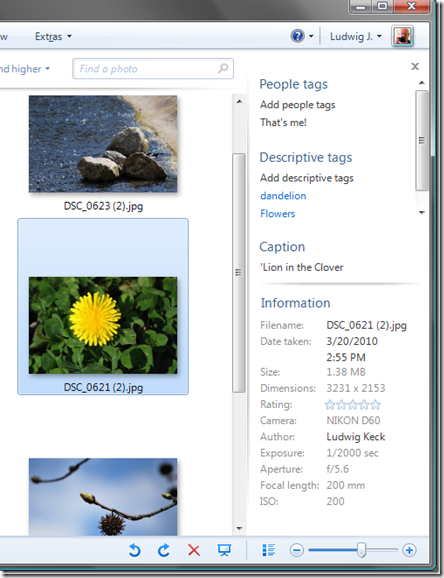
Windows Live Photo Gallery makes extensive use of “tags” for managing and finding photos. The Info pane shows “People tags” – none in this case, “Descriptive tags” that have been assigned either in the import operation or manually later. For this picture two tags are shown, there is a scroll bar to allow displaying additional tags. Also shown is the file “Caption” which in other applications may be called “title”. The Information portion provides the file name and details, the rating that is assigned, the “Author” and some of the camera data. Cameras assign file names, during import that can be changed. I like to retain the file name assigned by the camera. In this case that name was appended with “(2)” when I made a copy of the file.
To see more of the data, right-clicking the thumbnail and selecting “Properties” – then the “Details” tab, brings up a long list of information. Here are a couple of screen shots:
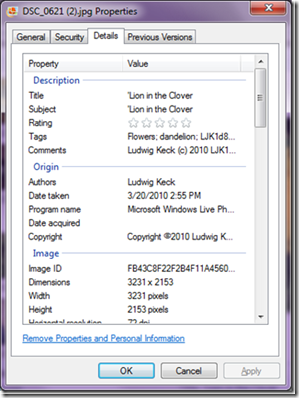

Notice the top section, “Description” includes the “title”, a “subject” – which can, of course be different from the title, the rating, tags and this can be quite a lengthy list and “Comments”. Comments can be added manually and may be quite long. Many cameras allow the user to define a comment string which is then recorded with each picture. This is what I did in this case. The next section, “Origin”, gives some data, author, and copyright, that was manually added or by a specialized program, and the automatically logged “date taken” and the name of the program that was last used to manipulate the photo, in this case Windows Live Photo Gallery. The “Image” section shows automatically generated data, as does the “Camera” and “Advanced photo” sections.
There is more, scrolling down reveals the “GPS” and “File” sections. The “file” section provides information about the name, location, and other parameters of the file pertaining to the local computer.

The GPS section shows the geographic coordinates of the location where the picture was take. Some cameras have built-in GPS receivers and can do this “geotagging” automatically. With some, an external GPS receiver can be attached. Many GPS units can transfer location data to pictures with special software. There are also applications that make adding this data manually rather easy.
The Properties dialog accessed inside Windows Live Photo Gallery is the same as what is obtained in Windows Explorer. The details pane in Windows Explorer also shows some of this data:

(View full-size image)
There is even more data stored. Some special programs permit displaying more of this information.
I want to show a couple of examples of how some of this information is used.
The Flickr photo sharing site serves photo enthusiasts for displaying, sharing, and finding photos. Since camera data shows the details of how the photo was taken, shutter speed, aperture, etc. that information can be a valuable learning tool. Flickr thus provides just about all the data that is embedded within a photo. Here is how this picture is shown on Flickr (the image provides a link to the page on flickr):

In the lower right there is a “More properties” link – and does it ever provide more:

And more:
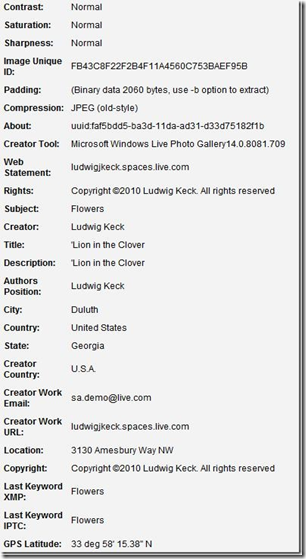
Note that in this list (which is shown just partially) there is location information, website of the author, even the author’s e-mail address. Here I am using the demonstration address used in my book, Digital Pictures Basics. (Mail sent to this address is not forwarded to me.)
Another sharing site, picasaweb, makes good use of the location information (the image provides a link to the picasaweb page).

(View full-size image)
Note the little map in the lower right. It shows where the picture was taken. The “View album map” link is even more fun:

(View full-size image)

(View full-size image)
It shows little thumbnails of the pictures in the album, placed on the map in the locations where the pictures where taken - the map can be zoomed and manipulated. Clicking on a thumbnail shows a larger picture.
So there is a lot of information that can be attached to photos and used in many fun and valuable ways. In another post I will discuss how to add, delete, and manage this “metadata”.
If you would like to explore the flickr or picasaweb images, click on the first image in each sequence above.
Here are some links to additional information about adding data from my other blog posts:
Moving photos from camera to computer using Windows Live Photo Gallery
More on moving photos from camera to computer using Windows Live Photo Gallery
Find your photos 2
Credits : Mr.Ludwig J
Link: http://ludwigjkeck.spaces.live.com/
More info and Comments can be viewed at http://ludwigjkeck.spaces.live.com/
In addition to the actual picture, photo files contain a lot of other information. It is like a little notebook with preprinted boxes for all sorts of information. The general term for that is “metadata”. Some of that information is obvious, the file name, date, file size, and more. Other data is more obscure. In this post I will explore some of that information. When a digital photo is taken, the majority of modern cameras store some data along with the image. This is known by the name “EXIF” data - “Exchangeable Image File Format”. When the photos are transferred to a computer this data is moved along. Using Windows Live Photo Gallery for making the transfer provides for attaching additional information at that time. Much more data can be added with other equipment or programs. To illustrate this I will use a photo for which I have “filled in” a lot of the data – by no means all that can be added. When the photo is selected in Photo Gallery the Info pane displays some of that data:

Windows Live Photo Gallery makes extensive use of “tags” for managing and finding photos. The Info pane shows “People tags” – none in this case, “Descriptive tags” that have been assigned either in the import operation or manually later. For this picture two tags are shown, there is a scroll bar to allow displaying additional tags. Also shown is the file “Caption” which in other applications may be called “title”. The Information portion provides the file name and details, the rating that is assigned, the “Author” and some of the camera data. Cameras assign file names, during import that can be changed. I like to retain the file name assigned by the camera. In this case that name was appended with “(2)” when I made a copy of the file.
To see more of the data, right-clicking the thumbnail and selecting “Properties” – then the “Details” tab, brings up a long list of information. Here are a couple of screen shots:


Notice the top section, “Description” includes the “title”, a “subject” – which can, of course be different from the title, the rating, tags and this can be quite a lengthy list and “Comments”. Comments can be added manually and may be quite long. Many cameras allow the user to define a comment string which is then recorded with each picture. This is what I did in this case. The next section, “Origin”, gives some data, author, and copyright, that was manually added or by a specialized program, and the automatically logged “date taken” and the name of the program that was last used to manipulate the photo, in this case Windows Live Photo Gallery. The “Image” section shows automatically generated data, as does the “Camera” and “Advanced photo” sections.
There is more, scrolling down reveals the “GPS” and “File” sections. The “file” section provides information about the name, location, and other parameters of the file pertaining to the local computer.

The GPS section shows the geographic coordinates of the location where the picture was take. Some cameras have built-in GPS receivers and can do this “geotagging” automatically. With some, an external GPS receiver can be attached. Many GPS units can transfer location data to pictures with special software. There are also applications that make adding this data manually rather easy.
The Properties dialog accessed inside Windows Live Photo Gallery is the same as what is obtained in Windows Explorer. The details pane in Windows Explorer also shows some of this data:

(View full-size image)
There is even more data stored. Some special programs permit displaying more of this information.
I want to show a couple of examples of how some of this information is used.
The Flickr photo sharing site serves photo enthusiasts for displaying, sharing, and finding photos. Since camera data shows the details of how the photo was taken, shutter speed, aperture, etc. that information can be a valuable learning tool. Flickr thus provides just about all the data that is embedded within a photo. Here is how this picture is shown on Flickr (the image provides a link to the page on flickr):

In the lower right there is a “More properties” link – and does it ever provide more:

And more:

Note that in this list (which is shown just partially) there is location information, website of the author, even the author’s e-mail address. Here I am using the demonstration address used in my book, Digital Pictures Basics. (Mail sent to this address is not forwarded to me.)
Another sharing site, picasaweb, makes good use of the location information (the image provides a link to the picasaweb page).

(View full-size image)
Note the little map in the lower right. It shows where the picture was taken. The “View album map” link is even more fun:

(View full-size image)

(View full-size image)
It shows little thumbnails of the pictures in the album, placed on the map in the locations where the pictures where taken - the map can be zoomed and manipulated. Clicking on a thumbnail shows a larger picture.
So there is a lot of information that can be attached to photos and used in many fun and valuable ways. In another post I will discuss how to add, delete, and manage this “metadata”.
If you would like to explore the flickr or picasaweb images, click on the first image in each sequence above.
Here are some links to additional information about adding data from my other blog posts:
Moving photos from camera to computer using Windows Live Photo Gallery
More on moving photos from camera to computer using Windows Live Photo Gallery
Find your photos 2
Credits : Mr.Ludwig J
Link: http://ludwigjkeck.spaces.live.com/
Saturday, March 20, 2010
Youtube – Change language from Hindi to English
Right from my childhood, I never liked Hindi and the Hindi Speaking people mainly because I don’t know HINDI. This may sound weird, but true. The Indian Youtube version was out and similar releases were made to most of the local hubs of internet word in countries and based upon the location, the language settings were made, without any prior notice, i repeat “NO PRIOR NOTICE”. It was a horror time for me to find out how to change the homepage from Hindi to English. Follow the steps below and enjoy the IPL telecasted over it.
1.Go to http://www.Youtube.com/ , so that the regional settings of youtube will be transferred to main control.

2.Now Scroll down to the bottom of the page and see the youtube copyright symbol.
3.You can see some text therein hindi as “भाषाएं दिखाएं” which means “Language: Hindi”, thanks to google translators. They help me clear this crap off.

4. Click on that and select the language you need. Choose English Preferably.
5.What next ??? Go and watch
IPL ROFL ;)
Oracle 11g 64-Bit on Windows 7 Ultimate 64-Bit
This day morning I upgraded my existing 64 bit vista ultimate install. That way I already had Oracle loaded and just needed to get it running.
It took several hours to do the upgrade. An install would probably have run much faster and I would have started off with a clean registry but I was afraid the Oracle installer would say it didn't recognize this version of windows and then I wouldn't be able to get it running (at least not without jumping through a bunch of hoops).
The install, while taking a long time, was flawless at the end. I had to uninstall skype and powershell because of incompatibilities. Skype was a recommendation but powershell was required. Considering the vast amount of software I have installed, I am surprised that is all I had to remove. 
I had a few issues with TNS at first but I was able to fix that by fixing my hosts file. After that, the database is running fine (as you can see in the screenshot above). I created a few objects and ran a few queries and everything is hunky dory.
I did get a warning message when running SQL Developer: 
Nothing I can't live with. I'm not sure if that is just a Java issue or something with SQL Developer specifically. I plan to play with it some more this afternoon to find out.
So far, I haven't found the OS to be that much different than vista. Some user tweaks in UAC. You can set the screen resolution with a single menu click now. It does feel quite a bit quicker response-wise though. I may just be psyching myself out on that though.
Rather than regurgitate a windows 7 feature list, go check out what Microsoft has to say on the issue.
I guess now it is off to play!
Fake Mails made easy ! Kudos to spoofing
It had been a week since a MSP posted about a issue that he got a mail from Mr.BillGates congratulating him for his work. Funny ! I decided to make a post on it and make some joy out of it. Do you wish to play pranks sending emails from a friend’s id? Here is how you go about doing it. It’s pretty much simple, all you need to do is go to the website, and there is a send-fake-email form where in you fill the from name, from address, to name, to address and then go about writing an email like you normally would do.
DeadFake
 DeadFake allows you to edit all ‘from’ and ‘to’ details before sending the email. It’s very quick and very easy. You don’t have to connect to the SMTP port of the site, issue commands and then send the email. Everything is done just like filling up an online form. One drawback being there is sentence at the bottom of the email sent which reads “No, this email’s not real, it’s http://deadfake.com”, but these things mostly go unnoticed when the recipient reads the email because even emails sent from yahoo usually have a link underneath which is usually not noticed by the reader.
Anonymous Speech
 Anonymous speech is also similar to DeadFake, here again the details can be edited before sending. But added to this you can set the date and time for sending the fake email and you could also send it to multiple recipients (up to 15). But before sending, you need to do a small sign-up with the website. But you needn’t worry; email address in the sign-up is only optional, just to trace your password.
Send Fake Mail
 A website that offers proper fake email sending without allowing the recipient trace the origin of the email. You can easily change the ‘from’ details so that the receiver thinks it’s from someone else. Added to this the service also offers Anonymous Browser, a utility that lets you browse the internet without revealing your correct IP address by creating a fake IP for you.
Services offered are:
– Anonymous Emailing
– Fake Emails
– Text & HTML Mail
– Priority Support
– X-Mailer Header
– Anonymous Surfing
But all this is not free, available to you at very minimal charges of $4.95/ month
Fuzz Mail
 Another service that could be used is Fuzzmail. Here again the ‘from’ and ‘to’ ids can be given by the user. But this not a normal fake email sending, but a service which records the act of typing and lets you send that as an email. The receiver gets to know at what point of time when typing your letter there has been a pause, or typos errors, write overs etc. This is greatly made to send those love letters to the loved ones so that receiver can get to actually feel the writing happening.
Note : Never ever try to trouble anyone, you may fall in some sort of legal problems. The use of these services is completely up to you and use them at your own risk only.
Friday, March 19, 2010
XP mode no longer requires hardware virtualization
I’d like to share some exciting news about Windows XP Mode. The team is removing the virtualization processor requirement for Windows XP Mode on Windows 7 Professional and Windows 7 Ultimate systems. Windows XP Mode continues to use hardware virtualization such as Intel Virtualization Technology (Intel® VT) or the AMD-V™ chipset when available but it no longer requires them.
Microsoft has released an update that enables PCs without hardware virtualization to also take advantage of Windows XP Mode. This change simplifies the customer experience and makes this benefit accessible to many more PCs.
Enterprise customers should consider using Microsoft Enterprise Desktop Virtualization (MED-V), part of the Microsoft Desktop Optimization Pack for Software Assurance. MED-V provides deployment and manageability features which are designed to address the needs of enterprise customers.
When will this happen?
The removal of this requirement has been publicly announced today, March 18th 2010 with the update available on the Windows XP Mode download page at the same time.
MED-V 1.0 SP1 builds on Microsoft Virtual PC 2007 to help enterprises with their upgrade to Windows Vista and Windows 7 when applications are not yet compatible.
MED-V 1.0 SP1 does not require hardware virtualization.
The user experience provided by MED-V is similar to “Windows XP mode” – even though a different virtualization technology is used.
MED-V 2.0 will leverage Windows Virtual PC and will benefit from the update above. Availability date for MED-V 2.0 is yet to be announced.
Thursday, March 18, 2010
PhotoSynth - Sri Krishna Arts and Science College
I'm happy to produce to you my College`s PhotoSynth ! Data to be updated Soon !
Sunday, March 7, 2010
Dream Spark Yatra @ Vellalar College, Erode...
No energy to blog today !
It was an damn Insane Conference with 2500+ students ;)
AWESOME ! ! !
Be back with the full report in a couple of days....
It was an damn Insane Conference with 2500+ students ;)
AWESOME ! ! !
Be back with the full report in a couple of days....
Thursday, March 4, 2010
DreamSpark Yatra @ Muthayammal College, Rasipuram,TamilNadu, INDIA.
It was a long time for me since I saw a good crowd.
http://picasaweb.google.co.in/sathyathemobileking/Upload?feat=directlink
To be blogged soon..... Please use the archives to see the previous event`s reports.
http://picasaweb.google.co.in/sathyathemobileking/Upload?feat=directlink
To be blogged soon..... Please use the archives to see the previous event`s reports.
Monday, March 1, 2010
Dream Spark Yatra @ Excel Engineering
Dream Spark Yatra @ Excel Engineering College

Event: Dream Spark Yatra
Dates: 27th February
Venue: Excel Engineering College
City: Komarapalayam, Namakkal
Organizers: Balaji , Arumugham, Abhishek Suresh
Speakers: SathyaNarayanan, Venkat, Indhuja, Harini, Shiva, Aravindhan, Gopinathan, Abhishek Suresh
Participants: 650 Students
Agenda (We had parallel Sessions:
For Auditorium 1
| Time | Session | Handling |
| 9:00 - 9:30 | Registration And Distribution of Goodies | |
| 9:30 - 10:00 | Inauguration | |
| 10:00 - 11:00 | Introduction to CBEUG, UX+Silverlight+WPF | Abhishek Suresh (President CBEUG) |
| 11:00 - 12:00 | Windows 7 | Indhuja Pillai |
| 12:00 - 13:00 | Microsoft Visio | Venkateswaran |
| 13:00 - 14:00 | Lunch Break | |
| 14:00 - 15:00 | Windows Azure | Harini Palanivel |
| 15:00 - 16:00 | Imagine Cup activity | Kennedy Singh |
| 16:00 – 16:30 | Project Natal | Shiva |
| 16:30- 17:00 | Certificate Distribution & Wind Up |
For Auditorium 2
| Time | Session | Handling |
| 9:00 - 9:30 | Registration And Distribution of Goodies | |
| 9:30 - 10:00 | Inauguration | |
| 10:00 - 11:00 | Introduction to CBEUG, Windows 7 | Sathya Narayanan ( Vice President CBEUG) |
| 11:00 - 12:00 | Microsoft DeepZoom, Photosynth, Live Writer | Gopinathan.R |
| 12:00 - 13:00 | Project Kodu | Aravindhan .A |
| 13:00 - 14:00 | Lunch Break | |
| 14:00 - 15:00 | Blogging, Facebook, MIXed Technology | Abhishek Suresh |
| 15:00 - 16:00 | Small Basic | Indhuja Pillai |
| 16:00 – 16:30 | Imagine Cup activity | Kennedy Singh |
| 16:30- 17:00 | Certificate Distribution & Wind Up |
Microsoft Dreamspark yatra is the new initiative by Microsoft Academic team to cover 100 cities in 10 weeks. We CBEUG set our own goal of covering 10,000 students across CBEUG territories during this Dream Spark Yatra. As of now our Usergroup has reached out to 16,000 Students. A major milestone for the Usergroup
This was the Second DreamSpark Event at Excel Engineering College, in Namakkal, on 27th February 2010. This is the 3rd city of our DreamSpark Campaign.
This event was organized by the CBEUG MSP, Balaji. The way he organized the entire event was awesome. He did it single handedly without any assistance from any other MSP.He pulled off the DreamSpark Yatra amazingly well. The hospitality provided was good. We had more than 380 students in a single hall with a mixture of students coming from various departments like MCA, Computer Science, Electronics, Electrical and IT.
The chief guests were
Abhishek Suresh – President, CBEUG
Other Special invites were
Sathyanarayanan, MSP, Vice President, CBEUG
Indhuja, MSP, CBEUG
Aravindhan, MSP, CBEUG
Shiva, MSP, CBEUG
Harini, MSP, CBEUG
Next stop … Rasipuram | Muthayammal College of Engineering :)
Wednesday, February 24, 2010
Paper Presentation @ SNR & Sons College, Coimbatore.
It was a long time since I was on a outing with my college class mates, in the name of so called "Competition". Today I was called by one of my college junior Mr.Mohammed Sait in the morning, wherein he asked me whether we can go for some competition ! I was puzzled, it was almost 9:00 in the morning, for which the competition was to start at 10:30. I had very less intention of going to college today, having my bike under a damn bad condition. I started to that college and was happy to see my full gang of friends inside the college campus. It was said that all the papers that have been selected has been intimated ! Whereas it was that instance for I knew that papers should have been sent to the college before two days, and the conformation being sent the successive day.
As a normal innocent student, I went to the Program Coordinator and said, "Sir, I've sent the paper 2 days ago, and i fear that my paper is not yet selected, as I did not get any confirmation. Please do check the credentials and fallback. So that I can decide on whether to stay or leave to my college.". I was astonished to get a reply from him where he said, "Sorry sir, I'm deeply sorry for the inconvenience, You can present the paper once the confirmed list is over. There was around 113 participants inside the hall"...
I sat down with my sweet laptop at 11:00, I started preparing the slides for the paper presentation.. It was funny that i never knew the topic on which I was supposed to present the topic. Finally I came across some dump papers inside my bag, submitted it as a formality hard copy and made my own presentation which was totally irrelevant to the submitted paper. I was suprizingly called to present the paper as 5th speaker, for which i was only done with 3 slides in the PC where it comprised of one side introducing the paper, other an simple image of Windows Azure and other the conclusion slide, which was just my own info side. I somehow managed to make the presentation with those slides.
I went in front of the speaker and started my speech as "A very hot Good Afternoon to one and all present here, It gives me an immence pleasure to stand before you and introduce three main objects of the day, 1. Mr.Mohammed Sait... my junior 2. myself S SathyaNarayanan and 3rd My presentation on Cloud computing"..... This was to be the funniest intro ever given by anyone till date. The judges were to say nothing but to simply sit and hear my sweet voice :D .
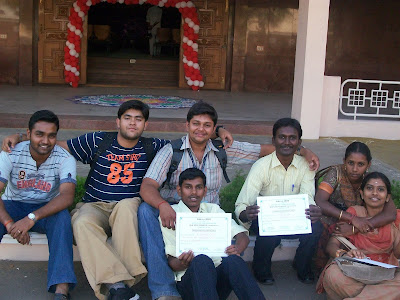
The session went on well till the end and questions were shooted at me for 20 min. Wherein I was feeling too hungry with the smell direct aroma from kitchen nearby. It was around some 15:00 hrs, the quiz results were out, where Mr.Aswin who is afriend of mine. and Mr.Vikram were selected for the finals. And Mr. Bhuvanesh & Ms.Sathya were short listed for the finals... I was happy that my college was short listed for the finals in all the competitions... out of the 10 ppl from my college, 8 ppl got selected. After which the final results were out and the results were simply awesome. guess what ??? Our college won the First place in all the Competitions, except debugging, where they lost by a single point :(
The prizes were distributed by the college Principal, and luckly i was awarded Rs.1000/- as first prize amount. All my college mates also got the First prize in all the events and it was summed up to some 4k... We enjoyed a lot over the victory in the college. Merrily and happily we left off the college in a passionate way!
And the saddest part of the day : I missed off Microsoft`s DreamSpark Yatra @ TCE.... I wish i would have attended it :( :( :( Next stop----> Kanchipuram !
As a normal innocent student, I went to the Program Coordinator and said, "Sir, I've sent the paper 2 days ago, and i fear that my paper is not yet selected, as I did not get any confirmation. Please do check the credentials and fallback. So that I can decide on whether to stay or leave to my college.". I was astonished to get a reply from him where he said, "Sorry sir, I'm deeply sorry for the inconvenience, You can present the paper once the confirmed list is over. There was around 113 participants inside the hall"...
I sat down with my sweet laptop at 11:00, I started preparing the slides for the paper presentation.. It was funny that i never knew the topic on which I was supposed to present the topic. Finally I came across some dump papers inside my bag, submitted it as a formality hard copy and made my own presentation which was totally irrelevant to the submitted paper. I was suprizingly called to present the paper as 5th speaker, for which i was only done with 3 slides in the PC where it comprised of one side introducing the paper, other an simple image of Windows Azure and other the conclusion slide, which was just my own info side. I somehow managed to make the presentation with those slides.
I went in front of the speaker and started my speech as "A very hot Good Afternoon to one and all present here, It gives me an immence pleasure to stand before you and introduce three main objects of the day, 1. Mr.Mohammed Sait... my junior 2. myself S SathyaNarayanan and 3rd My presentation on Cloud computing"..... This was to be the funniest intro ever given by anyone till date. The judges were to say nothing but to simply sit and hear my sweet voice :D .

The session went on well till the end and questions were shooted at me for 20 min. Wherein I was feeling too hungry with the smell direct aroma from kitchen nearby. It was around some 15:00 hrs, the quiz results were out, where Mr.Aswin who is a
The prizes were distributed by the college Principal, and luckly i was awarded Rs.1000/- as first prize amount. All my college mates also got the First prize in all the events and it was summed up to some 4k... We enjoyed a lot over the victory in the college. Merrily and happily we left off the college in a passionate way!
And the saddest part of the day : I missed off Microsoft`s DreamSpark Yatra @ TCE.... I wish i would have attended it :( :( :( Next stop----> Kanchipuram !
Monday, February 22, 2010
DreamSpark Yatra at SASTRA
Dream Spark Yatra event was conducted at SASTRA University, Tanjavor by the Coimbatore User Group in association with the Microsoft India Academic Team. The details of the event are as follows:

Event: Pre- Dream Spark Yatra
Dates: 21st February
Venue: SASTRA University, Thanjavur
Organizers: Varma, Kusumakar, Animesh , Arumugham, Abhishek Suresh
Speakers: Natraj, SathyaNarayanan, Ramakrishna, Abhishek Suresh
Participants: 380 Students (Mixed Audience)
Agenda:
08.30 - 9.00: Registration / Welcome Speech
9.00 - 10.00: Azure (by Natraj)
10.00 - 11.00: Windows 7 (by SathyaNarayanan)
11.00 - 11.30: Ice Cream Break
11.30 - 12.30: Microsoft Powerpoint 2010 (by Abhishek Suresh)
12.30 - 1.30: DeepZoom & Photosynth (by Ramakrishnan)
1.30 - 14.00: Feed Back & Wind UP !


DreamSpark Yatra has been planned in 15 more colleges till date and lots more to come !
Next Stop….. Erode “Excel Engineering”
Sunday, February 14, 2010
DreamSpark Yatra @ Hindustan Institute of Technology

DreamSpark Yatra is an Initiative by the Microsoft India Academic Team till the end of April 2010.And the vision of my user group (CBEUG) is to cover 100 cities in 10 weeks. Being One of the proud CBEUGian, I managed to organize this event in Hindustan Institute of Technology , Coimbatore on 15th of February.
The eminent speakers aka student ambassadors for the giant companies (like google , microsoft , mozilla) present there were : Indhuja , Harini Palanivel , Siva , Gopinath and me as well ;) .This is the list of the sessions handled by all of my mates :
Sathya Narayanan : Multi Point SDK and some core features of Windows 7
Indhuja :Small Basic
Harini : Microsoft Academics
Siva : IE8 Customization
Gopinath: Windows Azure (cloud computing)
We had a good start in the morning with , the speech of Harini followed up by Indhuja ( the most popular bragger ... LOL jus kidding ;) ) followed up by me and siva after the Welcome note of the HOD , CSE department (Loganathan) and a professor , and me .
The first session was about Microsoft Academics , and the second followed up by Gopinath`s session ... and this time he learned many new things more than the first time @ IRTT .Because at that time , he never cared to prepare anything and he did on the spot preparation with the help of Ramakrishnan .But this time , he went on with more stuff like video presentations and was even prepared for the live demo but unfortunately there was no internet connection .. so he had to skip the live demo .But he would have enjoyed the response when he said that He is a ITian and still now I do hear that .(The students gave a roaring response) .
The students present in the Dreamspark Yatra were a mixture of CSE , IT and even ECE too .After his session we had a nice lunch and the Hospitality of the college was really good .After that , Indhuja started her session ... she was handling her audience like a play toy never minded that they were seniors to her (she is a 2nd year student).
Then I took my session with a game demo which was fun filled and we had a great time with our give aways to the participants. I had to learn lot of stuffs from that session, "Never expect more from DUMB Students". It was insane for me to make many tries and gain their attraction, I succeeded only at my 4th attempt. The session was too technocratic and I guess many would have gained knowledge from it. I had the session for 1 hour and showed them lot of demos on Win 7 & Multi-point SDK.
Finally Siva Concluded the Technical session with a IEAK demo which was good either, it was to be his first session and i'm proud that i gave him one such opportunity to prove his talent and the DreamSpark Yatra had a great end to its beginning ;)
Next Stop : SASTRA UNIVERSITY | Thanjavore, TamilNadu...
Download Offline Installers Of .NET Frameworks
 As many of the new Microsoft Windows applications are developed using .NET Framework, it is becoming mandatory to install .NET Framework on our personal computers. Microsoft provides .NET Framework installer as a free download available to everyone. But it is an online installer. That means, initially we have to download a small piece of installer and upon starting the installation process the installer automatically connects to Microsoft servers and downloads the required components and completes the installation.
 The offline installers works great as long as we have internet connectivity always. But many of us required offline installer to install the software on computers not connected to internet, to save the bandwidth while installing on many computers, etc.
I gathered a set of links on Microsoft servers from where we can download the offline installers of .NET Framework 3.5, .NET Framework 3.5 Service Pack 1, .NET Framework 3.0 and .NET Framework 2.0.
.NET Framework Client Profile Offline Installer
.NET Framework 3.5 Setup
.NET Framework 3.5 Setup Service Pack 1
.NET Framework 3.0 Setup
.NET Framework 2.0 Setup
Wednesday, February 3, 2010
99 shortcuts for Windows 7:
Here are some 99 ready-to-use Windows 7 desktop shortcuts ! Simply download them and place the one’s you want on your Windows 7 desktop.
The collection of 99 shortcuts have been neatly classified and the zipped download includes the following folders with these shortcuts:
Shut Down Menu – Hibernate, Lock / Switch User, Log Off, Restart, Shut Down, Sleep.
Troubleshooting - Aero Troubleshoot, Audio Playing Troubleshoot, Audio Recording Troubleshoot, Hardware & Devices Troubleshoot, HomeGroup Troubleshoot, Incoming Connections Troubleshoot, Internet Connections Troubleshoot, Internet Explorer Performance Troubleshoot, Internet Explorer Safety Troubleshoot, Network Adapter Troubleshoot, Performance Troubleshoot, Power Troubleshoot, Printing Troubleshoot, Shared Files & Folders Troubleshoot, System Maintenance Troubleshoot, Windows Media Player DVD Troubleshoot, Windows Media Player Library Troubleshoot, Windows Media Player Settings Troubleshoot, Windows Troubleshooting Tools.
Windows Programs - Calculator, Command Prompt, Internet Explorer, Math Input Panel, Media Center, Notepad, Paint, Remote Desktop Connection, Run, Sidebar, Snipping Tool, Sound Recorder, Sticky Notes, Sync Center, Windows DVD Maker, Windows Explorer, Windows Fax and Scan, Windows Media Player, Windows Update, Wordpad, XPS Viewer.
Ease of Access – Ease of Access, Magnify, Narrator, On-Screen Keyboard, Speech Recognition.
System Administration Tools – Action Center, Aero Transparency On (works on 32-bit only), Aero Transparency Off (works on 32-bit only), Backup and Restore, Character Map, Computer, Control Panel, Default Programs, Desktop Personalization, Device Manager, Disk Defragmenter, Disk Cleanup, Display Settings, Folder Options, Fonts, Indexing Options, Keyboard, Mouse, Notification Area Icons, Parental Controls, Performance Information and Tools, Power Options, Private Character Editor, Region and Language, Resource Monitor, System Information, System Restore, Task Manager (All Users), Task Scheduler, Taskbar and Start Menu, User Accounts, Windows Easy Transfer, Windows Update.
Tablet PC – ShapeCollector, TabTip, Windows Journal.
Windows PowerShell – Windows PowerShell (x86), Windows PowerShell ISE (x86), Windows PowerShell ISE, Windows PowerShell.
Networking – Homegroup, Internet Options, Network and Sharing Center, Network, Windows Defender, Windows Firewall – Enable, Windows Firewall – Disable, Windows Firewall.
Download: 99 Ready-to-use Windows 7 desktop shortcuts
Head over to 7tutorials if you want a shortcut to a Windows 7 tool, which isn’t included in the collection,! A unique initiative, I must say!
UPDATE: Incidentally, it might be a good place to mention that we have just released one of our new portable freeware apps, Handy Shortcuts. You may want to check it out!
The collection of 99 shortcuts have been neatly classified and the zipped download includes the following folders with these shortcuts:
Shut Down Menu – Hibernate, Lock / Switch User, Log Off, Restart, Shut Down, Sleep.
Troubleshooting - Aero Troubleshoot, Audio Playing Troubleshoot, Audio Recording Troubleshoot, Hardware & Devices Troubleshoot, HomeGroup Troubleshoot, Incoming Connections Troubleshoot, Internet Connections Troubleshoot, Internet Explorer Performance Troubleshoot, Internet Explorer Safety Troubleshoot, Network Adapter Troubleshoot, Performance Troubleshoot, Power Troubleshoot, Printing Troubleshoot, Shared Files & Folders Troubleshoot, System Maintenance Troubleshoot, Windows Media Player DVD Troubleshoot, Windows Media Player Library Troubleshoot, Windows Media Player Settings Troubleshoot, Windows Troubleshooting Tools.
Windows Programs - Calculator, Command Prompt, Internet Explorer, Math Input Panel, Media Center, Notepad, Paint, Remote Desktop Connection, Run, Sidebar, Snipping Tool, Sound Recorder, Sticky Notes, Sync Center, Windows DVD Maker, Windows Explorer, Windows Fax and Scan, Windows Media Player, Windows Update, Wordpad, XPS Viewer.
Ease of Access – Ease of Access, Magnify, Narrator, On-Screen Keyboard, Speech Recognition.
System Administration Tools – Action Center, Aero Transparency On (works on 32-bit only), Aero Transparency Off (works on 32-bit only), Backup and Restore, Character Map, Computer, Control Panel, Default Programs, Desktop Personalization, Device Manager, Disk Defragmenter, Disk Cleanup, Display Settings, Folder Options, Fonts, Indexing Options, Keyboard, Mouse, Notification Area Icons, Parental Controls, Performance Information and Tools, Power Options, Private Character Editor, Region and Language, Resource Monitor, System Information, System Restore, Task Manager (All Users), Task Scheduler, Taskbar and Start Menu, User Accounts, Windows Easy Transfer, Windows Update.
Tablet PC – ShapeCollector, TabTip, Windows Journal.
Windows PowerShell – Windows PowerShell (x86), Windows PowerShell ISE (x86), Windows PowerShell ISE, Windows PowerShell.
Networking – Homegroup, Internet Options, Network and Sharing Center, Network, Windows Defender, Windows Firewall – Enable, Windows Firewall – Disable, Windows Firewall.
Download: 99 Ready-to-use Windows 7 desktop shortcuts
Head over to 7tutorials if you want a shortcut to a Windows 7 tool, which isn’t included in the collection,! A unique initiative, I must say!
UPDATE: Incidentally, it might be a good place to mention that we have just released one of our new portable freeware apps, Handy Shortcuts. You may want to check it out!
Sunday, January 31, 2010
26 Awesome Windows 7 Themes
Windows 7 is the first ever operating system from Microsoft that has been developed largely by keeping user feedback in mind. It is much more faster and better looking than Vista. If you are one of those users looking to upgrade or buy Windows 7, then you should definitely look out for some custom made themes. Today we present you 26 delighting and refreshing themes created by users of DeviantArt.
You will find the installation details along with other information on the respective developer’s page. I am sure that you will enjoy them all.


So which one do you plan to install? Let us know in the comments. Enjoy!
If you wanna download these, Bing it
You will find the installation details along with other information on the respective developer’s page. I am sure that you will enjoy them all.
Windows 7 Skull Visual Style by ~TheDarkenedPoet
Woodstock Windows 7 Theme by ~Markus-Deviant
Windows 7 RED Theme by ~XBMCG33K
ThaImpact VS for Windows 7 RC by ~DjabyTown
Underoath Theme for Windows 7 by ~bobmat4
Windows7 Black Transparent by ~pegass
Aerosnap 7 Theme by ~Freak180
OnlyBlack Windows 7 RC theme by ~tonev
AeroLighting For Windows 7 by ~neodesktop
Warsaw- Windows 7 Theme by ~G0DLIKE
Lumens for Windows 7 by ~alkhan
Desk 09 with New Windows 7 OS by ~Dr-Bee
Alternative for Windows 7 RC by ~oliver182
SiCo for Windows 7 RC by ~alkhan
Aero Diamond for Windows 7 x64 by ~alkhan
Heart Windows 7 Theme by ~soffl
Theme For Winodws 7 by ~Arturik1988
Windows 7 OSX by ~Black-Energy
Clean Green Windows 7 Theme by ~J-MGraphics650
Seven Aero Shine Blue For 7RC by ~molinarosp
Trans-7 Themepack by ~Crusader1080
SevenMaxClearLiveFinal For 7RC by ~molinarosp
Windows 7 Simple Black Glass by ~feliipetaumaturgo
Natural by ~phS2
Waterbomb and Windows 7 by ~Adrenalize81
Windows 7 with Classic Theme by ~RainingSkies
So which one do you plan to install? Let us know in the comments. Enjoy!
If you wanna download these, Bing it
Subscribe to:
Posts (Atom)